
CPU Saturation vs CPU Spike: Why IT Systems Slow Down and How to See It
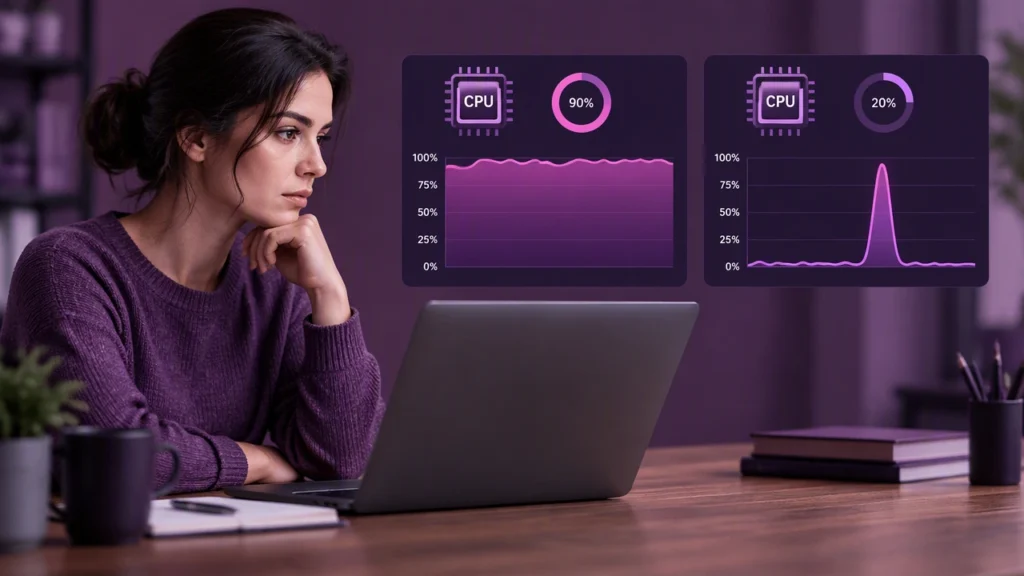
Every slow application tells a story, and the CPU often holds the first clue. Yet not every slowdown comes from the same kind of pressure. A short burst of activity can look alarming but pass without consequence, while a steady rise in demand can quietly degrade service for minutes or hours. In IT performance, the difference between a CPU spike and sustained CPU saturation is not just academic. It changes what you measure, what you investigate, and what you fix.
This article explains why systems slow down, how to distinguish a spike from saturation, and how to build observability that makes both easy to see.
Why CPU pressure matters
The CPU is a shared resource. When many threads need cycles at the same time, they queue. A small amount of queuing is normal. Deep or persistent queuing is not. As queuing grows, request latency rises, timeouts increase, and downstream services feel the impact.
CPU pressure can come from application logic, garbage collection, serialization and deserialization, cryptographic operations, database work on the same host, or noisy neighbor effects in a shared environment. The cause matters, but the first question is simpler: is this a short burst or a long plateau?
What a CPU spike really is
A CPU spike is a brief, sharp increase in utilization. It often lasts seconds to a few minutes and then returns to a baseline. Spikes are common during cache misses, cold starts, batch job kicks, traffic bursts, or one-off tasks such as report generation.
During a spike, you may see higher latency for some requests, but the system usually recovers without intervention. The danger of a spike is not the spike itself but the pattern around it. If spikes happen more often, cluster together, or hit during other stress, they can push a system into saturation.
What sustained CPU saturation means
Sustained CPU saturation is a longer period where CPU utilization stays at or near a ceiling, often 95 to 100 percent across one or more cores, and queuing builds up. Saturation means the system cannot finish work as fast as work arrives. Latency climbs, throughput may flatten or drop, and tail latencies get worse.
Saturation can be caused by a runaway process, a poorly tuned query, a hot key in a cache, a thread pool sized too small for the workload, or a deployment that changed the cost per request. Unlike a spike, saturation usually does not resolve on its own.
How to tell them apart in practice
The key is to look at both level and duration. A single high sample is not enough. You need a time series and a way to describe how full the CPU is relative to available capacity.
- Level: Saturation often sits near 100 percent on one or more cores. A spike may touch 100 percent but usually across fewer cores and for a shorter window.
- Duration: A spike is short and self-limiting. Saturation persists for minutes to hours unless you change load or capacity.
- Queue signals: Look for run queue length or scheduler latency. Saturation shows a growing queue. A spike may show a brief bump with quick recovery.
- Latency shape: During saturation, p95 and p99 latencies rise steadily. During a spike, you often see a narrow burst of high latency that falls back quickly.
- Correlated metrics: Saturation often aligns with high context switching, increased I/O wait when threads block, and a drop in throughput per unit of CPU. Spikes may not show these secondary effects.
In short, a spike is an event. Saturation is a state. That distinction drives your response.
Why the difference matters for response
If you treat every spike like saturation, you may over-provision, add complexity, or mask a real problem. If you treat saturation like a spike, you may wait for recovery that never comes.
- For spikes: Confirm frequency and blast radius. Check if retries, caches, or rate limits amplify the burst. Consider smoothing the workload with backoff or job scheduling. Validate that autoscaling is not reacting to noise.
- For saturation: Reduce demand or increase capacity. Profile the hot path. Fix the query, the algorithm, or the thread pool. Add or move cores if the workload is truly CPU bound. Check for noisy neighbors or resource limits in containers.
The right action follows the pattern you observe, not a single high reading.
How to see both with observability
Good observability turns raw metrics into a clear picture. Start with CPU utilization at the host, container, and process level. Then add saturation signals that reveal queuing, not just usage.
Metrics to collect
- Utilization: Overall and per-core CPU usage, sampled at 10 to 30 seconds.
- Saturation: Run queue length, scheduler wait time, or equivalent OS metrics. In containers, watch CPU throttling and period usage.
- Workload shape: Request rate, error rate, and latency percentiles for the service.
- Process signals: Top CPU consumers by process or thread, garbage collection pauses, and context switch rate.
How to analyze
- Use windows: Compare 1-minute, 5-minute, and 15-minute averages. Spikes fade in longer windows. Saturation stays.
- Set two thresholds: One for warning (for example, sustained 80 percent across cores for five minutes) and one for critical (for example, sustained 95 percent with rising p99 latency).
- Correlate: Overlay CPU with latency, error rate, and deployment markers. If saturation lines up with a new release, the change is likely the cause.
- Inspect per core: A single hot core can bottleneck a single-threaded component while overall utilization looks moderate.
What to do when you find it
- If it is a spike: Confirm it is rare and short. Verify that retries and circuit breakers are healthy. Check autoscaling cooldowns to avoid thrash.
- If it is saturation: Profile. Find the hot function or query. Right-size thread pools. Consider caching or precomputation. Scale horizontally if the workload is parallelizable, or vertically if it is not.
A practical mental model
Think of the CPU as a highway. A spike is a short surge of cars at an on-ramp. Traffic slows for a moment, then clears. Saturation is a long stretch where the road is full and cars keep arriving. The line grows, travel time rises, and the jam spreads. Your job is to watch the road long enough to know which one you have, then act accordingly.
Common pitfalls to avoid
- Averaging too much: A one-hour average hides both spikes and saturation. Use multiple windows.
- Ignoring per-core view: Overall utilization can be misleading in mixed or single-threaded workloads.
- Chasing the wrong signal: Autoscaling on CPU alone can oscillate. Combine CPU with latency and queue depth.
- Forgetting the workload: CPU is a means, not an end. Always tie CPU behavior to user-facing latency and throughput.
Key takeaways
- A CPU spike is brief and often self-resolving. Sustained CPU saturation is a persistent state that degrades service until you change load or capacity.
- Use both utilization and saturation metrics to tell them apart.
- Base your response on duration, queuing, and latency impact, not a single high reading.
- Build observability that shows per-core and per-process detail, with multiple time windows and clear thresholds.
When you can see the difference clearly, you stop reacting to noise and start solving the right problem. That is how you keep IT systems responsive under real-world pressure.